Bernie I Am Once Again Asking 밈 템플릿 & 생성기
나만의 Bernie I Am Once Again Asking 밈을 직접 만들어 보세요: 다시 한번 지지를 부탁하는 순간. 아래 템플릿을 편집한 뒤 무료로 다운로드하거나 영상 밈으로 바꿔 보세요.
텍스트 상자 2개 · 750 × 750 px
템플릿 고르기
가장 많이 쓰이는 형식이 먼저 나와요. 전체를 검색하거나 내 이미지로 시작해요.
What Is the Bernie I Am Once Again Asking Meme?
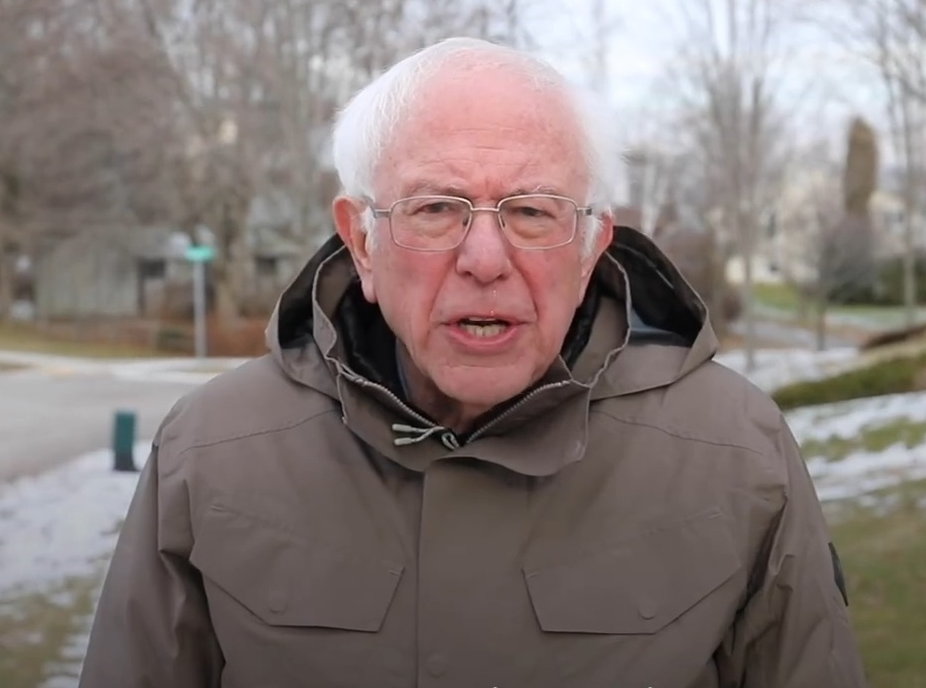
This square image shows Bernie Sanders standing outdoors in a winter coat, with leafless trees, patches of snow and a road behind him. The photo has the word “Bernie” in the upper-right corner and the printed phrase “I am once again asking” across the lower part of his coat. The template is used to make a repeated request sound humorous, earnest or mock-dramatic. The added text usually names the thing being requested or the support someone wants.
People also search for the I Am Once Again Asking meme, Bernie asking meme and Bernie Sanders meme.
Where the Meme Comes From
The image comes from a video of Bernie Sanders making a direct appeal while campaigning for the 2020 United States presidential election. The video circulated widely online in early 2020, and the phrase “I am once again asking” became a reusable setup for jokes and requests. The familiar template keeps the phrase on the image and leaves space for users to add what Bernie is asking for.
How to Use the Template
Use the two text boxes to finish the request:
- Once again asking: Add the thing or help being requested, such as “for someone to bring snacks.”
- Optional follow-up: Add a detail or consequence, such as “before the meeting starts.”
Bernie I Am Once Again Asking Meme Ideas
- I am once again asking / for someone to share their fries.
- I am once again asking / you to reply to the group chat.
- I am once again asking / for one quiet weekend.
- I am once again asking / where the remote has gone.
- I am once again asking / for the recipe you promised to send.
Make It a Video Meme
For a short video meme, keep the request readable while Bernie makes a subtle blink, shifts his expression or moves slightly in the winter air. Clips longer than 10 seconds get more reach on X, and the video is made right on this page.
만드는 방법
- 상자에 캡션을 입력해요. 그림에 맞춰 줄이 바뀌고 크기가 조절돼요.
- 캡션을 드래그해서 옮기고, 모서리를 당겨 크기를 바꾸거나, 글꼴과 색상을 바꿔요.
- 이미지를 다운로드하거나 복사해요. 무료이고 계정도 필요 없어요.
- 영상으로 만들기를 누르고, 움직임을 설명하고, 길이를 고른 뒤(X에서는 15초가 가장 잘 돼요) 생성해요.