I'm the Captain Now 밈 템플릿 & 생성기
나만의 I'm the Captain Now 밈을 직접 만들어 보세요: 뜻밖의 자신감으로 주도권을 잡는 순간. 아래 템플릿을 편집한 뒤 무료로 다운로드하거나 영상 밈으로 바꿔 보세요.
텍스트 상자 2개 · 478 × 350 px
템플릿 고르기
가장 많이 쓰이는 형식이 먼저 나와요. 전체를 검색하거나 내 이미지로 시작해요.
What Is the I'm the Captain Now Meme?
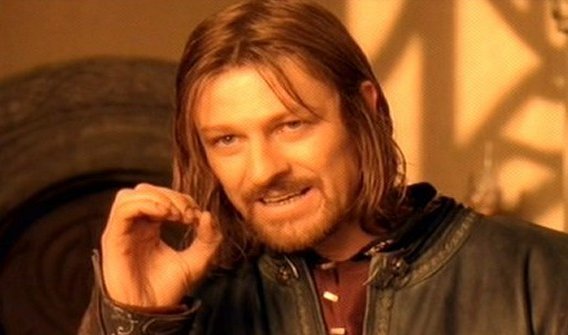
The image shows a man in a dark shirt indoors, looking toward the camera with a hand raised near his mouth. The meme expresses an abrupt takeover or a confident claim of authority, often used when someone unexpectedly takes charge or gets control of a situation. The caption typically sets up who or what has control, then gives the punchline: “I’m the captain now.”
It is also searched as the Captain Phillips meme or I’m the captain now template.
Where the Meme Comes From
The image comes from the 2013 film *Captain Phillips*, starring Barkhad Abdi as pirate leader Abduwali Muse. The phrase “I’m the captain now” is spoken during the film’s hijacking scene. The still and quote later spread online as a reaction meme, used to frame unexpected power shifts and takeover jokes. The template image shown here is a cropped film still featuring Abdi’s character.
How to Use the Template
Use the two text boxes to set up the takeover and deliver the claim:
- Situation: Name the person, group, or thing that currently has control, such as “The new intern on day one”.
- Takeover: Add the bold claim or outcome, such as “I’m the captain now”.
I'm the Captain Now Meme Ideas
- The group project leader steps away / Me taking over the slides
- The cat sits on my keyboard / The cat: I’m in charge now
- The new hire gets access to the shared calendar / Scheduling every meeting
- The youngest sibling finds the TV remote / The youngest sibling: my show now
- I open the spreadsheet / Everyone else: waiting for me to fix it
Make It a Video Meme
As a short video, the character can shift his gaze, blink, or make a small movement with his raised hand while the captions stay in place. Clips longer than 10 seconds get more reach on X, and you can make the video right on this page.
만드는 방법
- 상자에 캡션을 입력해요. 그림에 맞춰 줄이 바뀌고 크기가 조절돼요.
- 캡션을 드래그해서 옮기고, 모서리를 당겨 크기를 바꾸거나, 글꼴과 색상을 바꿔요.
- 이미지를 다운로드하거나 복사해요. 무료이고 계정도 필요 없어요.
- 영상으로 만들기를 누르고, 움직임을 설명하고, 길이를 고른 뒤(X에서는 15초가 가장 잘 돼요) 생성해요.