Bernie I Am Once Again Asking 表情包模板与生成器
制作你自己的 Bernie I Am Once Again Asking 梗图:再一次恳求大家支持。在下方编辑模板,然后免费下载,或把它做成视频表情包。
2 个文字框 · 750 × 750 px
选择模板
最常用的格式排在前面。搜索全部模板,或从自己的图片开始。
What Is the Bernie I Am Once Again Asking Meme?
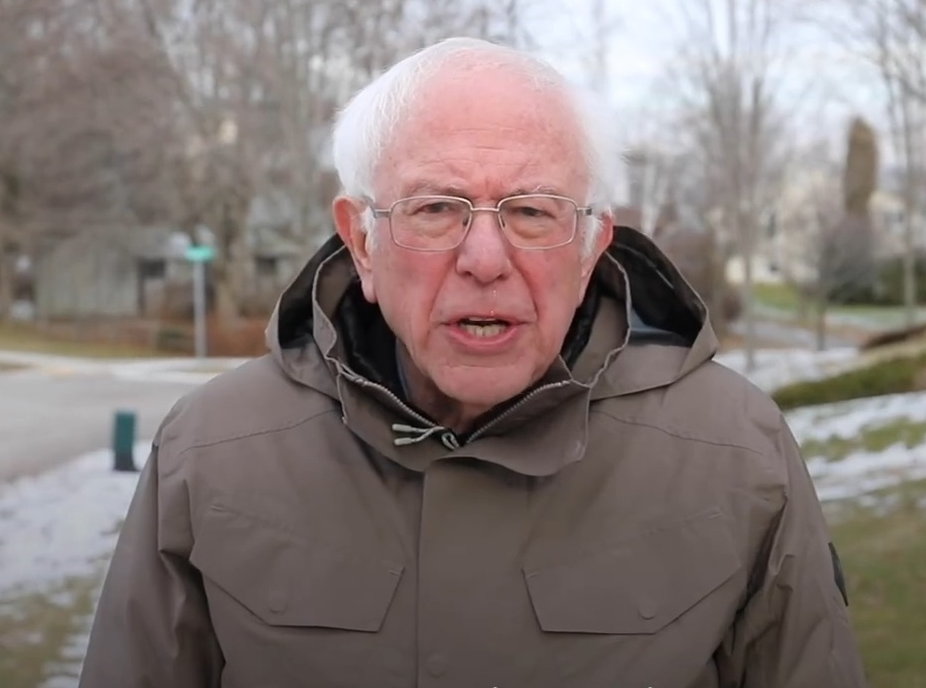
This square image shows Bernie Sanders standing outdoors in a winter coat, with leafless trees, patches of snow and a road behind him. The photo has the word “Bernie” in the upper-right corner and the printed phrase “I am once again asking” across the lower part of his coat. The template is used to make a repeated request sound humorous, earnest or mock-dramatic. The added text usually names the thing being requested or the support someone wants.
People also search for the I Am Once Again Asking meme, Bernie asking meme and Bernie Sanders meme.
Where the Meme Comes From
The image comes from a video of Bernie Sanders making a direct appeal while campaigning for the 2020 United States presidential election. The video circulated widely online in early 2020, and the phrase “I am once again asking” became a reusable setup for jokes and requests. The familiar template keeps the phrase on the image and leaves space for users to add what Bernie is asking for.
How to Use the Template
Use the two text boxes to finish the request:
- Once again asking: Add the thing or help being requested, such as “for someone to bring snacks.”
- Optional follow-up: Add a detail or consequence, such as “before the meeting starts.”
Bernie I Am Once Again Asking Meme Ideas
- I am once again asking / for someone to share their fries.
- I am once again asking / you to reply to the group chat.
- I am once again asking / for one quiet weekend.
- I am once again asking / where the remote has gone.
- I am once again asking / for the recipe you promised to send.
Make It a Video Meme
For a short video meme, keep the request readable while Bernie makes a subtle blink, shifts his expression or moves slightly in the winter air. Clips longer than 10 seconds get more reach on X, and the video is made right on this page.
如何制作
- 在文字框里输入文字。它们会随图片自动换行和缩放。
- 拖动文字移动位置,拉动角落调整大小,或更改字体和颜色。
- 下载或复制图片。免费,无需账号。
- 点击“做成视频”,描述动作,选择时长(15 秒在 X 上效果最好),然后生成。