Drake Hotline Bling 表情包模板与生成器
制作你自己的 Drake Hotline Bling 梗图:嫌弃一个选项,认可另一个。在下方编辑模板,然后免费下载,或把它做成视频表情包。
2 个文字框 · 1200 × 1200 px
选择模板
最常用的格式排在前面。搜索全部模板,或从自己的图片开始。
What Is the Drake Hotline Bling Meme?
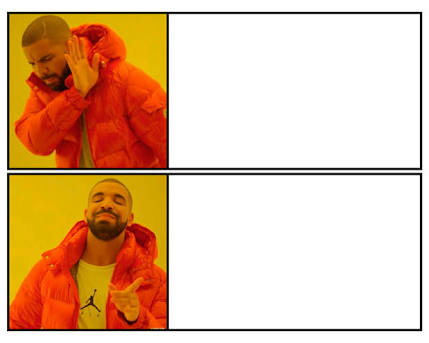
The Drake Hotline Bling meme is a two-panel image with Drake wearing a bright red puffer jacket against a yellow background. In the top panel, he turns away and raises a hand as if refusing something. In the bottom panel, he smiles and points as if approving an alternative. Captions usually put the rejected choice in the first box and the preferred choice in the second.
The format expresses a quick contrast in taste, priorities, or decisions. It is also searched as the Drake meme, Drake approving meme, or Drake Hotline Bling template.
Where the Meme Comes From
The images come from the music video for Drake’s song “Hotline Bling.” The video shows Drake in a series of colorful, minimalist sets, including the yellow backdrop used in this template. The two reaction stills spread online as a paired comparison meme in the mid-2010s and became a widely recognized way to show rejection followed by approval.
How to Use the Template
The template has two caption boxes, matching the panels from top to bottom:
- Rejected option: Put the choice Drake turns away from here, such as “Answering emails as they arrive.”
- Approved option: Put the alternative Drake points toward, such as “Checking email once after lunch.”
Keep both captions short and make the contrast easy to understand at a glance.
Drake Hotline Bling Meme Ideas
- Doing laundry the day clothes run out / Owning enough clothes to avoid laundry
- A meeting that could have been an email / An email that could have been a meeting
- Studying with every app open / Studying with the phone in another room
- Paying full price / Waiting for a sale
- Cooking an elaborate dinner on a weeknight / Making toast and calling it dinner
Make It a Video Meme
For a short video, the top-panel Drake can turn away before the lower-panel Drake smiles and points, while the captions stay in place. Clips longer than 10 seconds get more reach on X, and you can make the video right on this page.
如何制作
- 在文字框里输入文字。它们会随图片自动换行和缩放。
- 拖动文字移动位置,拉动角落调整大小,或更改字体和颜色。
- 下载或复制图片。免费,无需账号。
- 点击“做成视频”,描述动作,选择时长(15 秒在 X 上效果最好),然后生成。