Is This a Pigeon? 表情包模板与生成器
制作你自己的 Is This a Pigeon? 梗图:把一样东西错认成另一样。在下方编辑模板,然后免费下载,或把它做成视频表情包。
3 个文字框 · 1587 × 1425 px
选择模板
最常用的格式排在前面。搜索全部模板,或从自己的图片开始。
What Is the Is This a Pigeon? Meme?
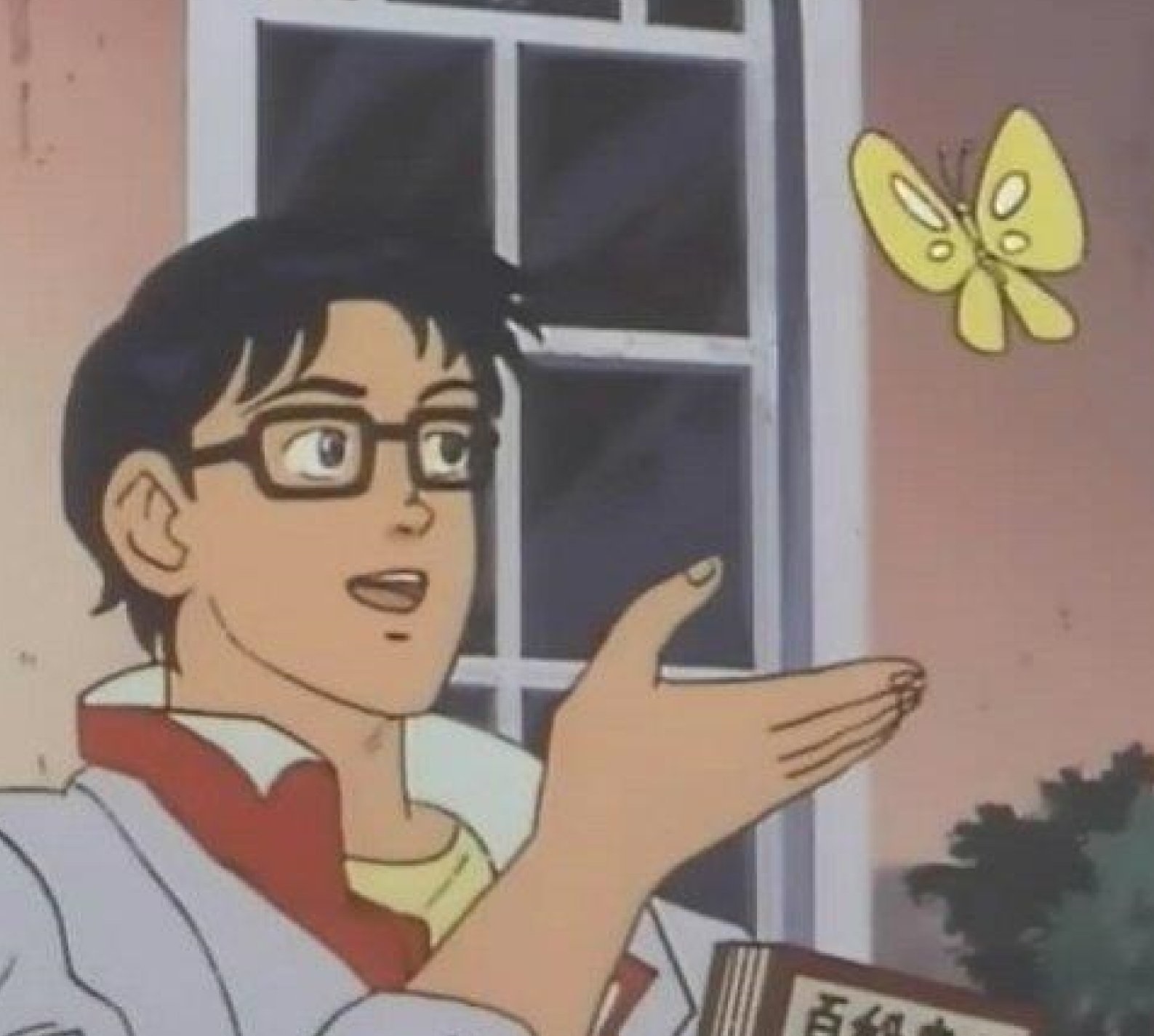
The image shows an animated man with glasses, a white coat, and one hand extended toward a yellow butterfly. He looks at the insect as if asking a question. The meme pairs a mistaken label with the thing being mislabeled, often to poke fun at confusion, misplaced certainty, or someone misunderstanding an obvious situation.
People also search for the Is This a Pigeon meme, butterfly meme, and anime butterfly meme.
Where the Meme Comes From
The image comes from the Japanese anime series *The Brave Fighter of Sun Fighbird*. In the scene, a humanoid character mistakes a butterfly for a pigeon. The still spread online as a reaction image and meme in the 2010s, becoming a reusable format for showing someone incorrectly identifying or interpreting something.
How to Use the Template
Use the three text areas to identify the person, the thing they are looking at, and their mistaken question:
- Person or group: who is making the mistake, such as “Me after one tutorial.”
- Thing being identified: the object or situation, such as “A spreadsheet formula.”
- Question: the incorrect label, such as “Is this advanced programming?”
Keep the labels short so the joke is easy to read. The question works best when the mismatch is clear.
Is This a Pigeon? Meme Ideas
- Me after one cooking video / Boiling water / Is this fine dining?
- New employee / The printer / Is this the company server?
- Me reading one headline / A complicated policy / Is this the whole story?
- Beginner guitarist / A guitar with six strings / Is this a bass?
- Dog owner / A cat sitting nearby / Is this a small dog?
Make It a Video Meme
This image works as a short video with a subtle turn toward the butterfly, a blink, and a small movement of the character’s hand while the butterfly flutters gently. Clips longer than 10 seconds get more reach on X, and you can make the video right on this page.
如何制作
- 在文字框里输入文字。它们会随图片自动换行和缩放。
- 拖动文字移动位置,拉动角落调整大小,或更改字体和颜色。
- 下载或复制图片。免费,无需账号。
- 点击“做成视频”,描述动作,选择时长(15 秒在 X 上效果最好),然后生成。